See which AI bots read your site, and who they send back.
GPTBot, ClaudeBot, PerplexityBot and 21 other AI crawlers, counted page by page, next to the visits ChatGPT, Perplexity and Gemini actually send you. Measured on your own server, where an analytics script cannot see and an ad blocker cannot hide.
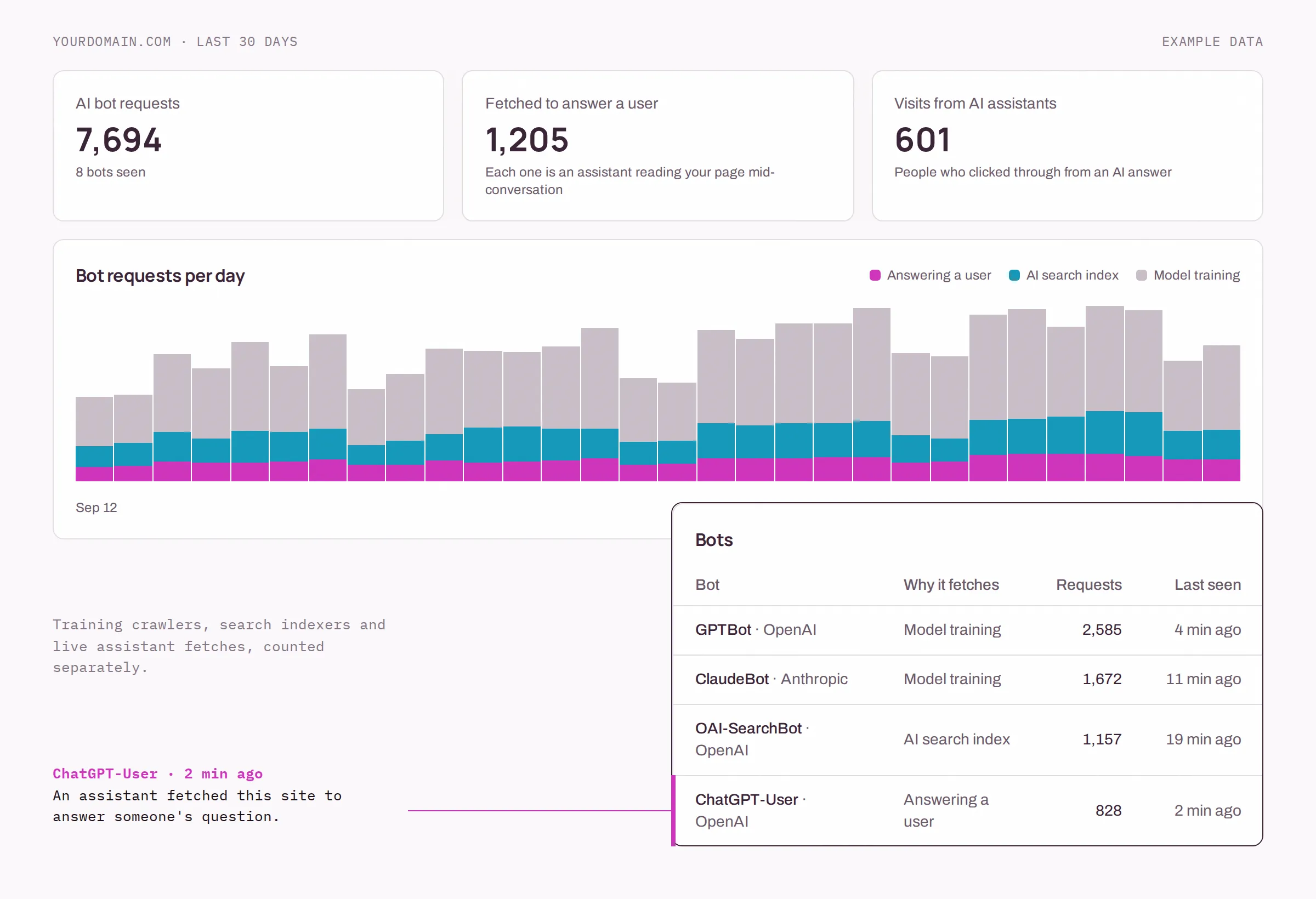
Not every AI bot means the same thing
A raw count of "AI bot hits" mixes three different activities. The report keeps them apart, because only one of them tells you someone was just asking about you.
- 01
Answering a user
Someone asked an assistant a question and it fetched your page to answer it. This is the closest thing to watching a citation happen.
ChatGPT-UserClaude-UserPerplexity-UserGemini-Deep-Researchmeta-externalfetcherMistralAI-UserDuckAssistBot
- 02
AI search index
Crawlers building the index that AI search answers from. If these never reach a page, that page is unlikely to be cited.
OAI-SearchBotClaude-SearchBotPerplexityBotGoogle-CloudVertexBotApplebotAmazonbotYouBot
- 03
Model training
Crawlers collecting training data. Usually the bulk of the volume, and the ones that send nothing back.
GPTBotClaudeBotanthropic-aiGoogleOthermeta-externalagentBytespiderCCBotcohere-aicohere-training-data-crawlerDiffbot
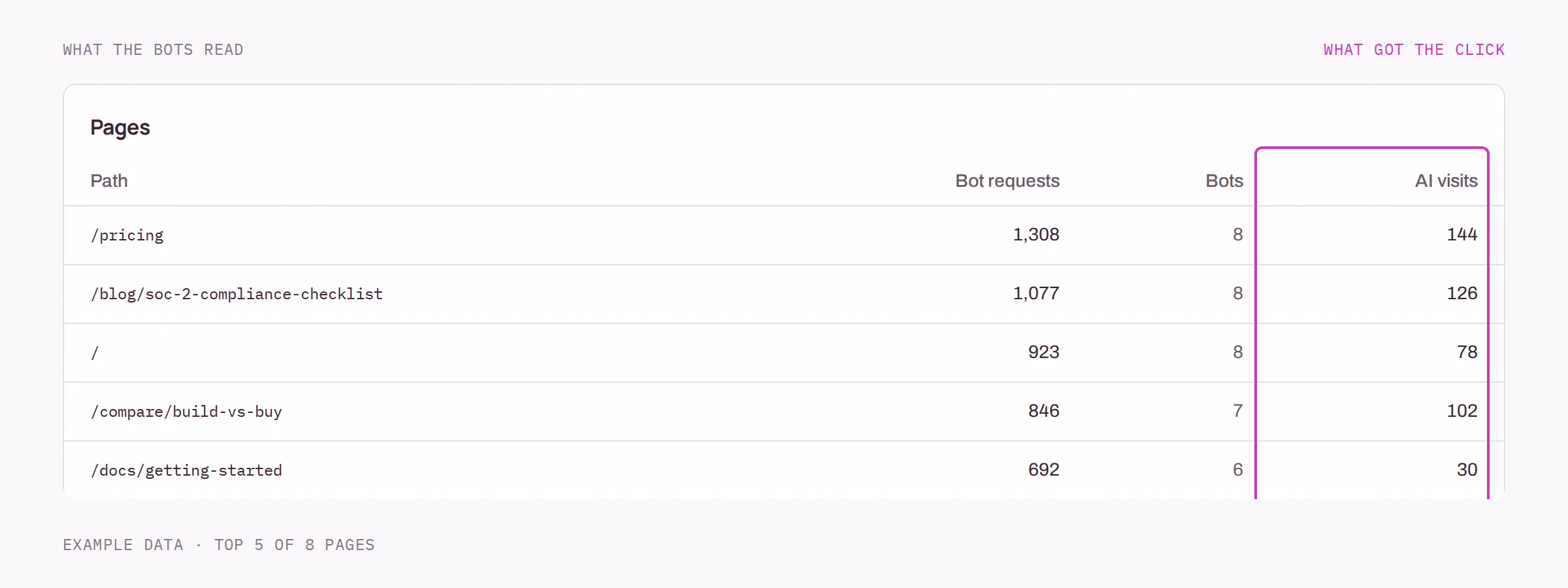
The pages AI reads, against the pages that get the click
Every path is listed with how often bots fetched it, how many different bots did, and how many people arrived on it from an AI answer. A page that is read constantly and never clicked is being used as a source. A page that gets the clicks is the one to keep current.
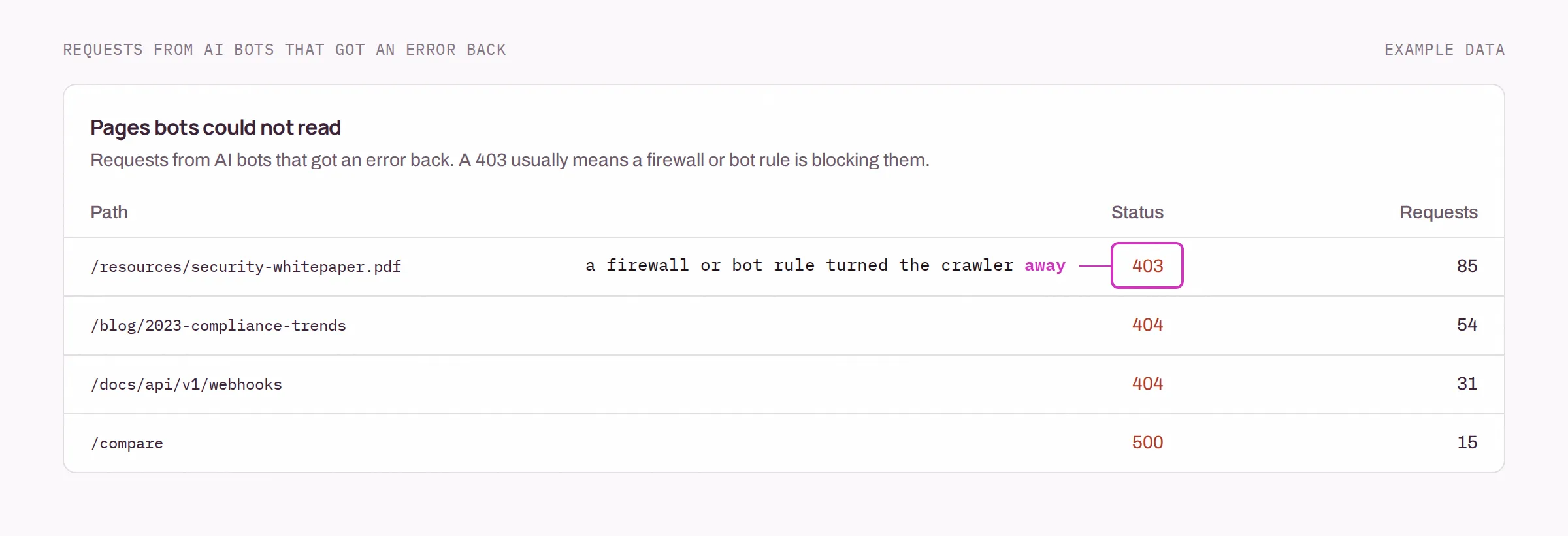
Find the pages bots were refused
An AI bot that gets a 403 or a 404 has nothing to read, and a page it cannot read is a page it cannot cite. The report lists every path where an AI bot got an error back, so a firewall rule or a deleted post shows up as a line you can fix.
One small Worker, on your own Cloudflare account
This is the whole collector, not an excerpt. It decides at the edge whether a request is worth reporting, so your ordinary visitors never leave your site.
- 01 Add your domain in Simplitas and copy its ingestion token.
- 02 Deploy this script as a Worker routed to your domain.
- 03 The report fills in as bots and AI-referred visitors arrive.
- Sent:
- path, status, user-agent, referrer and size, for AI bot hits and AI-referred visits only.
- Never sent:
- IP addresses, cookies, response bodies, or anything about other visitors.
- Stored:
- daily counts per bot, page and status. Not individual requests.
// Simplitas AI Traffic collector
const ENDPOINT = 'https://www.simplitas.com/api/v1/logs'
const AI_BOT = /ChatGPT-User|OAI-SearchBot|GPTBot|Claude-User|Claude-SearchBot|ClaudeBot|anthropic-ai|Perplexity-User|PerplexityBot|Gemini-Deep-Research|Google-CloudVertexBot|GoogleOther|meta-externalfetcher|meta-externalagent|MistralAI-User|DuckAssistBot|Applebot|Amazonbot|YouBot|Bytespider|CCBot|cohere-ai|cohere-training-data-crawler|Diffbot/i
const AI_SOURCE = /chatgpt\.com|chat\.openai\.com|perplexity\.ai|gemini\.google\.com|copilot\.microsoft\.com|claude\.ai|chat\.deepseek\.com|meta\.ai|grok\.com|chat\.mistral\.ai|you\.com/i

export default {
  async fetch(request, env, ctx) {
    // The response is passed through untouched and its body is never read.
    const response = await fetch(request)

    const url = new URL(request.url)
    const userAgent = request.headers.get('user-agent') || ''
    const referer = request.headers.get('referer') || ''
    const utmSource = url.searchParams.get('utm_source') || ''

    if (AI_BOT.test(userAgent) || AI_SOURCE.test(referer) || AI_SOURCE.test(utmSource)) {
      const log = {
        timestamp: Date.now(),
        host: url.hostname,
        method: request.method,
        path: url.pathname,
        status_code: response.status,
        user_agent: userAgent,
        referer,
        query_params: utmSource ? { utm_source: utmSource } : {},
        bytes_sent: Number(response.headers.get('content-length')) || 0,
      }
      // waitUntil + catch: reporting can be slow or fail without the visitor ever noticing.
      ctx.waitUntil(
        fetch(ENDPOINT, {
          method: 'POST',
          headers: { 'Content-Type': 'application/json', 'X-API-Key': env.SIMPLITAS_LOG_TOKEN },
          body: JSON.stringify([log]),
          signal: AbortSignal.timeout(5000),
        }).catch(() => {}),
      )
    }

    return response
  },
}
What it does not do
- Your domain has to be on Cloudflare. The collector is a Cloudflare Worker. On another CDN you can post logs to the same endpoint yourself, but there is no ready-made integration.
- Bots are identified by user-agent. A request that claims to be GPTBot is counted as GPTBot. Requests are not yet checked against each company's published IP ranges, so a scraper impersonating a crawler will be counted as one.
- It measures traffic, not answers. It shows that an assistant read your page, not what it then said. For that, the AI Visibility Tracker asks ChatGPT the questions your buyers ask every day, ranks the brands it names and lists the pages it cites.
Questions
How do I track traffic from ChatGPT?
Two signals identify it. A visit that arrives with a chatgpt.com referrer, or with utm_source=chatgpt.com on the URL, was sent by ChatGPT. Separately, requests from the ChatGPT-User bot are ChatGPT fetching your page while it answers someone. Simplitas counts both on your own server, per page and per day.
What is GPTBot?
GPTBot is the crawler OpenAI uses to collect training data for its models. It is different from OAI-SearchBot, which builds the index for ChatGPT search, and from ChatGPT-User, which fetches a page when a person asks ChatGPT something. AI Traffic reports the three separately because they mean different things.
Why not just use Google Analytics?
Analytics scripts run in a browser, and crawlers do not run them, so GA4 never sees a bot. It can show visits referred by an AI assistant, but only for visitors whose browser has not blocked it. AI Traffic counts at the edge of your own site, before the page is served, so it sees both the bots and the visits.
Will the collector slow my site down?
It passes every request straight through and never reads the response body. The report to Simplitas is sent after the response has already been returned to the visitor, and a failed or slow report is dropped rather than retried.
What data leaves my site?
Only requests made by an AI bot or arriving from an AI assistant: the path, status code, user-agent, referrer and response size. No IP addresses are sent, and ordinary visitors are never reported. Simplitas stores daily counts, not individual requests.
Does it count Googlebot and Bingbot?
No. They feed Google AI Overviews and Copilot, but the same requests also build the ordinary search index, so there is no way to say which crawl was for AI. Counting them would bury every AI-only bot in the report.
Find out who is already reading you
Connect a domain, deploy the Worker, and the first crawler usually shows up within hours.